
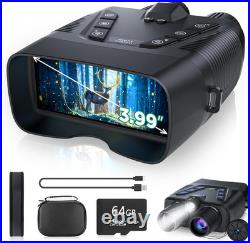
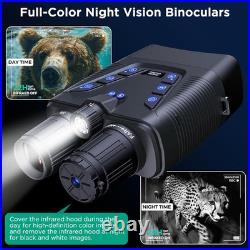
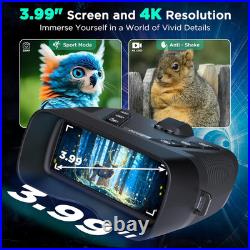


Experience the Night Like Never Before: Dive into the enchanting world of the night with the WASOCA 4K Night Vision Goggles. Recognized with the prestigious Muse Platinum Award, these goggles are designed for professionals and enthusiasts alike. The 4-inch TFT ultra-high-definition display, paired with a starlight-level sensor, allows you to witness the vivid colors and intricate details of the nocturnal landscape, even in total darkness or minimal light conditions.
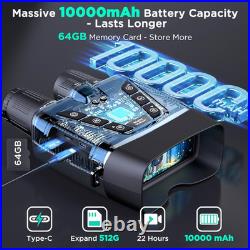
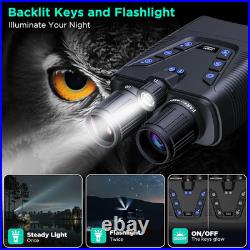
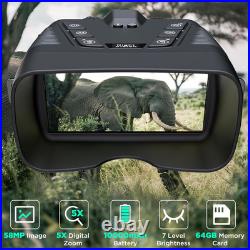
The backlit buttons allow for effortless operation in the darkest environments, while the fast charging module prepares you for spontaneous adventures. Capture Every Moment in Stunning Detail: Preserve the beauty of the night with breathtaking 58MP photos and 4K full HD video recording capabilities. The included 64GB memory card, expandable up to 512GB, guarantees ample storage for your treasured memories. With the ability to capture vibrant colors and fine details, you'll never miss a moment of your nighttime escapades.
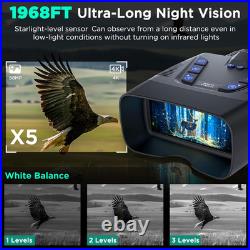
Extended Viewing Range for Close Encounters: Get up close and personal with the 5x zoom capability, reaching an impressive visual range of 1968ft (600 yards). The built-in microphone records high-definition videos and photos with synchronized sound, ensuring you capture the full auditory experience of your nighttime adventures.
Replay your captures with the playback feature, allowing you to relive every thrilling moment. Exceptional Clarity with Professional-Grade Features: The powerful 3W 850nm infrared light enables you to see with remarkable clarity, even in complete darkness. Capture stunning 58MP images in various lighting conditions, thanks to the infrared cut-off filter lens that optimizes performance in bright environments. Enjoy customizable viewing with 7-level adjustable screen brightness, allowing you to tailor your experience to any situation.
Versatile and Durable Design: Effortlessly transfer videos and images to your computer using the included Type-C charging cable for editing and sharing. Easily mount the night vision goggles to a standard 1/4 inch tripod for hands-free operation, and utilize the recess on the bottom to attach the infrared cut-off filter lens for enhanced versatility. Unleash the power of night vision with the WASOCA Night Vision Goggles - your ultimate companion for nocturnal adventures.
Navigate through the darkness with confidence, capturing every moment in stunning clarity. Our cutting-edge technology sets new standards in night vision, transforming the way you experience the night. Watch the product in action and discover its features through our informative videos.
Under the night sky, see everything, darkness is your playground. Darkness yields, our product gleams, turning challenges into chances. WASOCA Night Vision Goggles - See it clear, see it now, right on your computer. Setting new standards in night vision with our industry-leading technology. Please use the night vision goggles as shown in the video for optimal results.
How to use the focus ring? Please use the focus ring as shown in the video. Long press the Zoom In and Zoom Out buttons to adjust the zoom, with the value displayed on the screen. Adjust the lens imaging focus by rotating the lens until the clearest image is displayed. The video showcases the product in use.
The video guides you through product setup. The video compares multiple products. The video shows the product being unpacked. How to use the TF card? Please use the TF card as shown in the video.
Open the charging card sleeve to reveal the TF memory card slot. Insert the supplied memory card into the slot, ensuring the correct orientation as shown in the video. Press the'M' button after inserting the memory card to access the function page and format the card if it's your first time using it. How to use the harness? Please use the shoulder straps as shown in the video. Our ergonomic shoulder strap design is easy to use. Simply open the buckle, thread the strap through the grommet hole, and reinsert it into the buckle for secure wear. How to use the IR cut filter? Please use the infrared cut-off filter as shown in the video. Install the infrared cut-off filter to prevent overexposure in bright conditions. Remove the filter to capture clearer images and enjoy the vibrant colors of the night.
The filter can be stored in the mounting hole when not in use. How to use the backlight and tactical light? Please use the backlit buttons and tactical light as shown in the video. One-button operation to toggle the backlight, ensuring visibility of all buttons in the dark. Switch between strobe and constant-on modes for versatile use.